

Logitech MX Master 4 Wireless Mouse – Haptic Feedback, 8K DPI, Actions Ring
Logitech MX Master 4 Wireless Mouse – Haptic Feedback, 8K DPI, Actions Ring - Gray is backordered and will ship as soon as it is back in stock.
Pickup available at DokkanTech
Usually ready in 1 hour

Logitech MX Master 4 Wireless Mouse – Haptic Feedback, 8K DPI, Acti...

Description
Description
Logitech MX Master 4 Wireless Mouse
The Logitech MX Master 4 is a productivity wireless mouse with haptic feedback, an 8,000 DPI Darkfield optical sensor, the new Actions Ring for workflow automation, USB-C charging with up to 70 days of battery life, and multi-device pairing for up to 3 computers — designed for creative professionals, developers, and power users.
Key Features
- Haptic feedback — a first for the MX Master series. Customizable tactile response through Logi Options+, so you feel every scroll step and action confirmation.
- Actions Ring — a digital overlay that cuts repetitive mouse movement by up to 63% by surfacing custom commands, app launches, and shortcuts on demand.
- 8,000 DPI Darkfield sensor — tracks on virtually any surface, including glass (4 mm minimum), with adjustable sensitivity from 200 to 8,000 DPI.
- 2× stronger wireless connectivity versus previous MX mice, via Logi Bolt USB receiver or Bluetooth Low Energy.
- MagSpeed electromagnetic scroll wheel — auto-shifts between ratchet mode and 1,000-lines-per-second hyper-fast scrolling.
- Quiet Clicks — 90% less click noise for focused, distraction-free environments.
- USB-C fast charging — 1 minute of charging delivers approximately 3 hours of use.
Key Specifications
| Brand | Logitech |
| Model | MX Master 4 |
| Category | Wireless Productivity Mouse |
| Sensor | Darkfield optical, 200–8,000 DPI |
| Buttons | 7 programmable + Actions Ring |
| Scroll Wheel | MagSpeed electromagnetic with haptic feedback |
| Connection | Logi Bolt 2.4 GHz + Bluetooth Low Energy |
| Multi-Device | Up to 3 devices (Logitech Flow) |
| Power Source | Rechargeable Li-Ion, USB-C charging |
| Battery Life | Up to 70 days per charge |
| Compatible Systems | Windows 10/11, macOS 10.15+, ChromeOS, Linux |
| Hand Orientation | Right-handed |
| Colors | Gray, Black |
| Warranty | 1-year warranty from DokkanTech |
Best For
- Creative professionals working across 2+ monitors
- Software developers and UI/UX designers using shortcut-heavy workflows
- Power users managing both Mac and PC who want a single mouse for all devices
- Anyone upgrading from MX Master 3 or 3S who wants haptic feedback and Actions Ring
Not Ideal For
- Competitive gaming — this is a productivity mouse, not a gaming sensor profile
- Left-handed users — the ergonomic shape is right-hand only
- Users who never install companion software — Actions Ring and haptic customization require Logi Options+
How Does It Compare to the MX Master 3S?
Compared to the MX Master 3S, the MX Master 4 adds haptic feedback, the new Actions Ring for workflow automation, and 2× stronger wireless connectivity. The 8,000 DPI ceiling, MagSpeed scroll wheel, and Quiet Clicks are carried over from the 3S.
Frequently Asked Questions
Does the MX Master 4 charge via USB-C while in use?
Yes — the MX Master 4 supports use while charging via USB-C. A 1-minute quick charge delivers approximately 3 hours of use.
Does it need software to work?
The mouse works as a standard pointer out of the box. To customize haptic feedback, the Actions Ring, per-app shortcuts, or Logitech Flow, install Logi Options+ on Windows or macOS.
Does it work with Mac and iPad?
Yes — it works on macOS 10.15 or later. iPad support requires iPadOS with mouse pointer support. Full feature customization (haptic, Actions Ring) is available on Windows and macOS only.
How long does the battery last?
Up to 70 days on a full charge. Charging is via USB-C with fast-charge support.
Is it original?
Yes — sold by DokkanTech, Egypt's Authorized Logitech Reseller since 2019, with a 1-year warranty from DokkanTech.
What's in the box?
- MX Master 4 wireless mouse
- Logi Bolt USB receiver (pre-paired)
- USB-C charging cable
- User documentation
Warranty & Support
1-year warranty from DokkanTech.
For support, contact DokkanTech at 01285333313. Hours: 9 AM – 6 PM (work) / 9 AM – 10 PM (calls). Address: 12 د. حسنين عبد القادر، مدينة نصر.
Source: Specifications verified against Logitech official product documentation.
Last verified: May 2026.
Product comparison
| Facet |
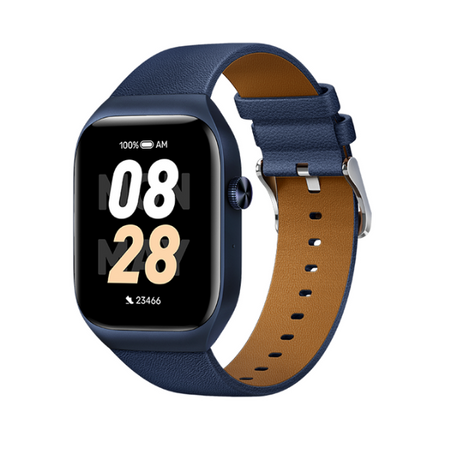
Mibro T2 Smart Watch (Deep Blue) - 1.75" Amoled Display, Bluetooth Calling, 10 Day Battery Life, 2ATM Waterproof, GPS Positioning View details | |||
|---|---|---|---|---|
| By | ||||
| By | Mibro | Haylou | Mibro | Amazfit |
| Price | ||||
| Price |
Sale price
LE 2,65000 EGP
Regular price
LE 3,35000 EGP
Unit price
|
Sale price
LE 1,22500 EGP
Regular price
LE 1,50000 EGP
Unit price
|
Sale price
LE 82500 EGP
Regular price
LE 1,15000 EGP
Unit price
|
Sale price
LE 1,35000 EGP
Regular price
LE 1,99900 EGP
Unit price
|