

Anker Soundcore Q20i ANC Headphones – Bluetooth 5, Hi-Res Audio, Black
Anker Soundcore Q20i ANC Headphones – Bluetooth 5, Hi-Res Audio, Black - Asia Box is backordered and will ship as soon as it is back in stock.
Pickup currently unavailable at DokkanTech

Description
Description
Soundcore by Anker Q20i Hybrid Active Noise Cancelling Headphones – A3004P11 – Black (Asia Version)
Overview
Experience premium sound and comfort with the Soundcore Q20i headphones by Anker. Designed with Hybrid Active Noise Cancelling (ANC) technology, these headphones let you immerse yourself in your favorite music or calls without distractions. Enjoy long-lasting playtime, Hi-Res audio, and seamless connectivity for both work and leisure.
Key Features
Hybrid Active Noise Cancelling (ANC)
-
Advanced hybrid ANC technology reduces ambient noise for a more immersive listening experience.
-
Perfect for travel, commuting, or noisy environments.
Hi-Res Audio with BassUp & Custom EQ
-
Delivers rich, clear, and powerful sound.
-
BassUp technology enhances low-frequency tones for deeper bass.
-
Customize your audio experience with the app-supported EQ settings.
Bluetooth 5.0 & Multi-Device Connectivity
-
Supports fast and stable Bluetooth 5.0 connection.
-
Multipoint feature allows connection to two devices simultaneously.
-
Seamlessly switch between devices with the intuitive controls.
Pairing & Reconnection Guide
-
Pairing: Press and hold the Power On button for 5 seconds when the headphones are off to enter pairing mode directly.
-
Reconnect: Press and hold the Power On button for 1–3 seconds; the headphones automatically reconnect to the last device. If reconnection fails after 5 seconds, they enter pairing mode again.
-
Pairing a second device: Double-click the Power On button to enter pairing mode without disconnecting the first device. Select the headphones on the second device to pair.
-
Multi-point usage: The headphones respond only to the last active device. Calls from a second device can be answered with a short press on the play/pause button or rejected with a long press. Music playback resumes automatically from the first device after the call.
Comfort & Battery Life
-
Lightweight, ergonomic design ensures all-day comfort.
-
Playtime: Up to 60 hours with ANC off, 40 hours with ANC on.
-
Fast Charging: 5 minutes of charging provides up to 4 hours of playtime.
Additional Features
-
Single microphone for clear calls.
-
AUX support for wired listening.
-
Foldable design for easy storage and travel.
Technical Specifications
-
Bluetooth Version: 5.0
-
Active Noise Cancelling: Hybrid ANC
-
Sound: Hi-Res Audio, BassUp, Customized EQ
-
Battery Life: 60H (ANC off), 40H (ANC on)
-
Charging Time: Fast Charging – 5 mins = 4 hours playback
-
Microphone: Single mic for calls
-
Multipoint Connection: ✔ Yes
-
Wired Listening: AUX support
-
Special Features: Bluetooth 5, Fast Charging, Foldable Design
How to Reconnect Your Soundcore Q20i Headphones
-
Power On: Press and hold the Power On button for 1–3 seconds until you hear the boot-up tone.
-
Automatic Reconnection: The headphones will automatically reconnect to the last paired device.
-
If Reconnection Fails: If the headphones do not reconnect after continuously sending a reconnection signal for 5 seconds, they will automatically enter pairing mode again, allowing you to select a device manually.
How to Connect Your Soundcore Q20i Headphones to a Second Device (Multi-Point Feature)
-
Enter Pairing Mode for Second Device:
-
After connecting to the first Bluetooth device, double-click the Power On button.
-
You will hear the pairing prompt and see the blue LED flash quickly, indicating the headphones are ready to pair with a second device.
-
-
Conditions for Second Device Connection:
-
The second device can only connect if the first device is inactive.
-
If the first device is actively sending sound, the headphones will not enter pairing mode.
-
-
Handling Calls on Two Devices:
-
If a call comes in on the first device while the second device is connected:
-
Short press the Play/Pause button to hang up the current call and connect to the waiting call.
-
Long press the Play/Pause button to reject the waiting call.
-
-
The Play/Pause button always responds to the last active device.
-
If music is playing on the first device and a call comes in on the second device, short press Play/Pause to answer the call. After the call ends, music from the first device resumes automatically.
-
-
Link Loss in Multi-Point Mode:
-
If any device loses connection, the headphones maintain connection with the other device for up to 10 minutes.
-
The LED indicates the status of the device that remains connected.
-
-
-
-
Product comparison
| Facet |
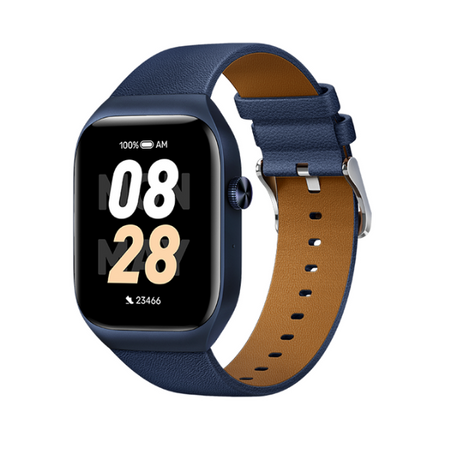
Mibro T2 Smart Watch (Deep Blue) - 1.75" Amoled Display, Bluetooth Calling, 10 Day Battery Life, 2ATM Waterproof, GPS Positioning View details | |||
|---|---|---|---|---|
| By | ||||
| By | Mibro | Haylou | Mibro | Amazfit |
| Price | ||||
| Price |
Sale price
LE 2,65000 EGP
Regular price
LE 3,35000 EGP
Unit price
|
Sale price
LE 1,22500 EGP
Regular price
LE 1,50000 EGP
Unit price
|
Sale price
LE 82500 EGP
Regular price
LE 1,15000 EGP
Unit price
|
Sale price
LE 1,35000 EGP
Regular price
LE 1,99900 EGP
Unit price
|