

j5create JCA365 USB-C to Dual HDMI Multi-Monitor Adapter
j5create JCA365 USB-C to Dual HDMI Multi-Monitor Adapter is backordered and will ship as soon as it is back in stock.
Pickup available at DokkanTech
Usually ready in 1 hour

j5create JCA365 USB-C to Dual HDMI Multi-Monitor Adapter

Description
Description
The j5create JCA365 USB-C to Dual HDMI Multi-Monitor Adapter works as an external USB graphics adapter that adds two HDMI displays to a Windows or macOS computer through a single USB-C port. One HDMI output supports up to 4K (3840 × 2160) at 30Hz and the other up to 2048 × 1152 at 60Hz, and the USB-C cable includes a USB Type-A adapter for computers without a USB-C port. Driver installation is required on Windows and macOS
Key Features
- Adds two HDMI displays through a single USB-C port
- HDMI 1 supports up to 4K (3840 × 2160) at 30Hz; HDMI 2 supports up to 2048 × 1152 at 60Hz
- USB-C cable with an included USB Type-A adapter for added compatibility
- Four display modes: Mirror, Extended, Primary, and Rotation (Rotation on Windows only)
- USB 3.1 connection with a transfer rate of up to 5Gbps
- Hot-swappable, so you can add or remove monitors without restarting your computer
- Audio output through HDMI
- Aluminum housing in a compact, lightweight design
- Bus-powered, with no external power adapter required
Key Specifications
| Specification | Details |
| Brand | j5create |
| Model | JCA365 |
| Product Type | USB-C to Dual HDMI Multi-Monitor Adapter |
| Host Connection | USB-C 3.1 (male), 20 cm cable, with included USB Type-A adapter |
| Video Outputs | 2 × HDMI |
| HDMI 1 Resolution | Up to 3840 × 2160 @ 30Hz |
| HDMI 2 Resolution | Up to 2048 × 1152 @ 60Hz |
| Display Technology | USB display adapter (external video card) |
| Display Modes | Mirror, Extended, Primary, Rotation (Windows only) |
| Audio Support | Yes (via HDMI) |
| Driver | Installation required on Windows and macOS |
| Compatible Operating Systems | Windows 10 or later, macOS 10.9 or later |
| Color | Silver |
| Warranty | Warranty coverage according to the applicable terms and DokkanTech's Warranty Policy. |
Best For
- Dual-monitor office setups
- Remote work
- Business productivity
- Financial dashboards and spreadsheets
- Presentations
- Home office workstations
- Multitasking across several applications
- Adding displays to USB-C or USB-A computers
Compatibility Notes
The j5create JCA365 requires driver installation on Windows and macOS; if the computer has network access and administrator rights, Windows can install the driver automatically when the adapter is plugged in. It supports Windows 10 or later and macOS 10.9 or later. A USB 3.1/3.0 port and a 4K-capable display are required for 3840 × 2160 output; when connected to a USB 2.0 port, resolution is limited to 2048 × 1152 at 60Hz. Only one adapter is supported per macOS computer, and Rotation mode is available on Windows only. The adapter is not intended for graphics-intensive applications such as gaming, and HDCP-protected content may not play on unsupported displays
Frequently Asked Questions
What's included in the box?
j5create JCA365 USB-C to Dual HDMI Multi-Monitor Adapter
Quick Installation Guide
What warranty applies?
Warranty coverage according to the applicable terms and DokkanTech's Warranty Policy.
Can I connect two HDMI monitors?
Yes. The adapter provides two HDMI outputs, adding two external displays through one USB-C port, or a USB Type-A port using the included adapter
Does it support 4K?
Yes, on one display. HDMI 1 supports up to 3840 × 2160 at 30Hz, while HDMI 2 supports up to 2048 × 1152 at 60Hz. 4K requires a USB 3.1/3.0 port and a 4K-capable display
Does it require drivers?
Yes. Driver installation is required on Windows and macOS
Does it work with Mac computers?
Yes. After installing the driver, it works with macOS 10.9 or later. Only one adapter is supported per macOS computer, and Rotation mode is available on Windows only
Product comparison
| Facet |
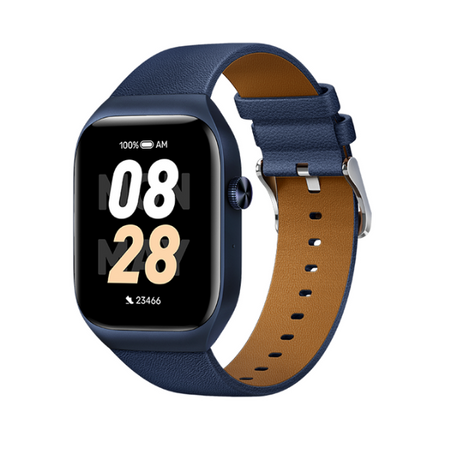
Mibro T2 Smart Watch (Deep Blue) - 1.75" Amoled Display, Bluetooth Calling, 10 Day Battery Life, 2ATM Waterproof, GPS Positioning View details | |||
|---|---|---|---|---|
| By | ||||
| By | Mibro | Haylou | Mibro | Amazfit |
| Price | ||||
| Price |
Sale price
LE 2,65000 EGP
Regular price
LE 3,35000 EGP
Unit price
|
Sale price
LE 1,22500 EGP
Regular price
LE 1,50000 EGP
Unit price
|
Sale price
LE 82500 EGP
Regular price
LE 1,15000 EGP
Unit price
|
Sale price
LE 1,35000 EGP
Regular price
LE 1,99900 EGP
Unit price
|