

j5create JCD543 13-in-1 USB-C Triple Display Docking Station
j5create JCD543 13-in-1 USB-C Triple Display Docking Station is backordered and will ship as soon as it is back in stock.
Pickup currently unavailable at DokkanTech

Description
Description
The j5create JCD543 USB-C Triple Display Docking Station turns a single USB-C port into a complete workstation with support for up to three external displays through 2 × HDMI, 1 × DisplayPort, and 1 × VGA outputs, plus USB 5Gbps connectivity, Gigabit Ethernet, an SD and microSD card reader, and USB-C Power Delivery pass-through up to 100W. Designed for professionals and remote workers, it connects through its attached USB-C cable and requires display driver installation on Windows and macOS
Key Features
- USB-C triple display docking station for expanding laptop connectivity
- Up to three external displays: HDMI + VGA + DisplayPort, or HDMI + VGA + HDMI
- 2 × HDMI and 1 × DisplayPort outputs up to 4K at 30Hz (1080p at 60Hz)
- 1 × VGA output up to 1920 × 1080 at 60Hz
- 3 × USB Type-A 5Gbps ports, including 1 fast-charge port (BC 1.2)
- 1 × USB-C 5Gbps data port
- USB-C Power Delivery 3.0 input for up to 100W pass-through charging (power adapter not included)
- Gigabit Ethernet (10/100/1000 Mbps) for reliable wired networking
- SD and microSD memory card reader/writer
- Attached USB-C host cable (45 cm)
- Display driver installation required on Windows and macOS
Key Specifications
| Specification | Details |
| Brand | j5create |
| Model | JCD543 |
| Product Type | USB-C Triple Display Docking Station |
| Host Connection | Attached USB-C cable (45 cm) |
| Video Outputs | 2 × HDMI, 1 × DisplayPort, 1 × VGA |
| Maximum Displays | Up to 3 external displays (HDMI + VGA + DisplayPort, or HDMI + VGA + HDMI) |
| HDMI / DisplayPort Resolution | Up to 3840 × 2160 @ 30Hz; 1920 × 1080 @ 60Hz |
| VGA Resolution | Up to 1920 × 1080 @ 60Hz |
| USB-A Ports | 3 × USB Type-A 5Gbps (1 × fast charge, BC 1.2) |
| USB-C Ports | 1 × USB-C 5Gbps (data), 1 × USB-C Power Delivery 3.0 input |
| Network Port | RJ-45 Gigabit Ethernet (10/100/1000 Mbps) |
| Card Reader | SD 3.0 & microSD 3.0 |
| Power Delivery | USB-C PD 3.0 input up to 100W for pass-through charging (power adapter not included) |
| Driver | Installation required on Windows and macOS |
| System Requirements | Windows 10 or later, macOS 10.14 or later; USB-C port with DisplayPort Alt Mode and PD 2.0/3.0 |
| Color | Silver and Black |
| Warranty | Warranty coverage according to the applicable terms and DokkanTech's Warranty Policy. |
Best For
- Triple-monitor office setups
- Remote work
- Professional workstations
- Content creation
- Business presentations
- Multi-monitor productivity
- Connecting multiple USB accessories
- Home office environments
Compatibility Notes
The j5create JCD543 requires display driver installation on Windows and macOS and a host USB-C port that supports DisplayPort Alt Mode and USB Power Delivery 2.0/3.0 (Windows 10 or later, macOS 10.14 or later). It supports up to three external displays using HDMI + VGA + DisplayPort or HDMI + VGA + HDMI; the DisplayPort and the second HDMI port cannot be used at the same time. On macOS, it supports 1080p in a triple display configuration when the VGA output is connected, or 4K in a dual display configuration without VGA. USB-C Power Delivery charging requires a compatible USB-C power adapter (sold separately)
Frequently Asked Questions
What's included in the box?
j5create JCD543 USB-C Triple Display Docking Station
Quick Installation Guide
What warranty applies?
Warranty coverage according to the applicable terms and DokkanTech's Warranty Policy.
Can I connect three monitors?
Yes. It supports up to three external displays using HDMI + VGA + DisplayPort or HDMI + VGA + HDMI, depending on your computer and operating system
Does it charge my laptop?
Yes. Connect a compatible USB-C power adapter (sold separately) to the Power Delivery 3.0 input for up to 100W pass-through charging
Does it include wired Ethernet?
Yes. It features a Gigabit Ethernet port supporting 10/100/1000 Mbps network speeds
Does it include memory card readers?
Yes. It has an SD and microSD memory card reader/writer
Does it require drivers?
Yes. Display driver installation is required on Windows and macOS
Product comparison
| Facet |
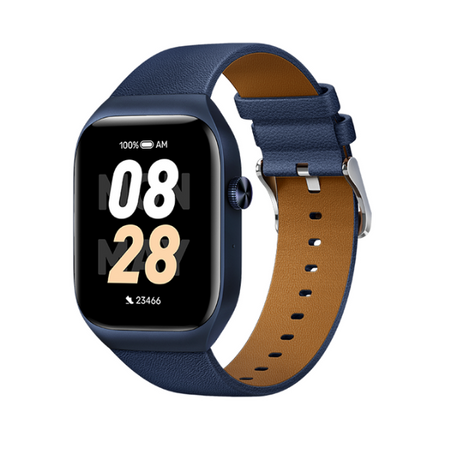
Mibro T2 Smart Watch (Deep Blue) - 1.75" Amoled Display, Bluetooth Calling, 10 Day Battery Life, 2ATM Waterproof, GPS Positioning View details | |||
|---|---|---|---|---|
| By | ||||
| By | Mibro | Haylou | Mibro | Amazfit |
| Price | ||||
| Price |
Sale price
LE 2,65000 EGP
Regular price
LE 3,35000 EGP
Unit price
|
Sale price
LE 1,22500 EGP
Regular price
LE 1,50000 EGP
Unit price
|
Sale price
LE 82500 EGP
Regular price
LE 1,15000 EGP
Unit price
|
Sale price
LE 1,35000 EGP
Regular price
LE 1,99900 EGP
Unit price
|